# Maintenance

The X55 is designed to be modular and low maintenance. It is strongly recommended to follow the table below to regularly inspect the X55 to avoid potential failure. Contact [info@arcskytech.com](mailto:info@arcskytech.com.if) if you have any questions.

## Determining Accrued Flight Time

To determine the flight hours, look up STAT\_FLTTIME in the parameters using Mission Planner or QGC. This is the total flight time in seconds. To get hours, simply divide by 3600. With Arcsky ArduPilot firmware version 4.3.7 and later, you will see flight hours displayed on the messages tab of QGC and Mission Planner about 1 minute after boot-up.&#x20;

## **Every 15 hours**

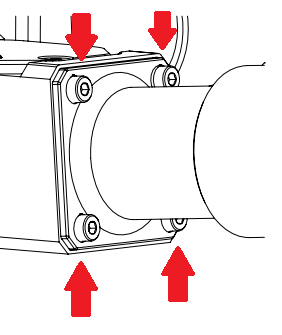
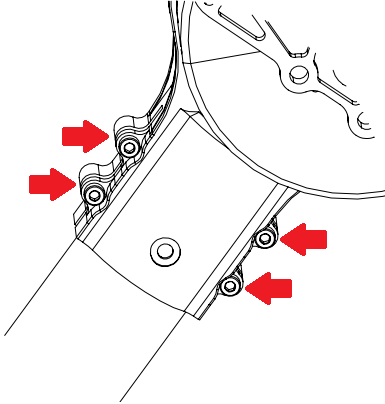
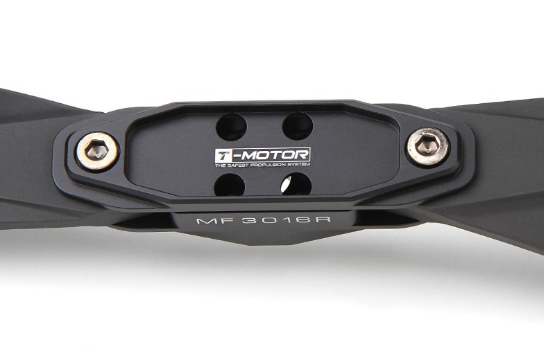
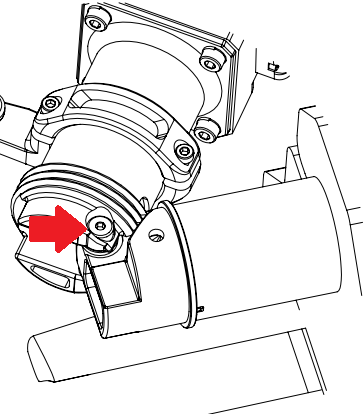
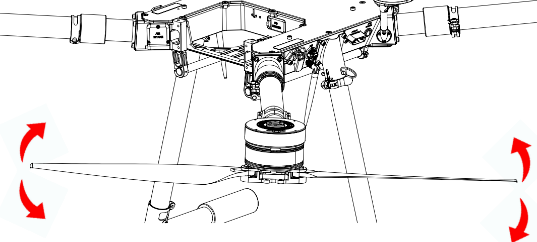
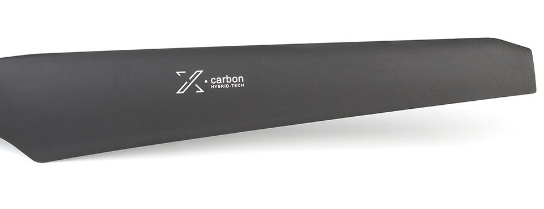
<table data-header-hidden data-full-width="false"><thead><tr><th></th><th></th><th></th></tr></thead><tbody><tr><td><strong>Item</strong></td><td><strong>Action</strong></td><td><strong>Description</strong></td></tr><tr><td>Arm fasteners</td><td>Inspect fastener tightness. </td><td><p></p><p><img src="/files/dJmq6sGNu1KFW1xH3frf" alt="" data-size="original"></p></td></tr><tr><td>Motor fasteners</td><td>Inspect fastener tightness. </td><td><p></p><p><img src="/files/2TzoI0On6EZ3O7uCdxVu" alt="" data-size="original"></p></td></tr><tr><td>Propeller fasteners</td><td>Inspect fastener tightness. </td><td><p></p><p><img src="/files/BEW9YH0LkNBRpS0xRBz7" alt="" data-size="original"></p></td></tr><tr><td>Arm shoulder bolt</td><td>Inspect fastener tightness. </td><td><p></p><p><img src="/files/0fLBPsPjm4l0cVozqc0E" alt="" data-size="original"></p></td></tr><tr><td>Arm set</td><td>With the arm in the locked position, check to make sure there’s <strong>no excess movement/play</strong> by trying to rotate the arm in both directions, using the propellers as leverage. (applying wiggling force on the propeller)</td><td><p></p><p><img src="/files/18YktDi7RLEB1wfxSwRx" alt="" data-size="original"></p></td></tr><tr><td>Propeller blades</td><td>Check the propeller blades for damage, nicks, scrapes</td><td><p></p><p><img src="/files/9iMCJETFwo7o2uTdpJ0O" alt="" data-size="original"></p></td></tr></tbody></table>

## **Every 100 hours/ 3 months**

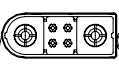
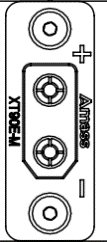
<table data-header-hidden data-full-width="false"><thead><tr><th></th><th></th><th></th></tr></thead><tbody><tr><td><strong>Item</strong></td><td><strong>Action</strong></td><td><strong>Description</strong></td></tr><tr><td>Motor </td><td>For any sign of damage, grinding sound</td><td><p></p><p></p></td></tr><tr><td>Motor fasteners</td><td>Inspect fastener tightness. </td><td><p></p><p><img src="/files/2TzoI0On6EZ3O7uCdxVu" alt="" data-size="original"></p></td></tr><tr><td>X55 flight batteries </td><td><p>Battery Charge Cycle</p><p></p><p>For long-term storage, charge/ discharge the battery to storage level.</p></td><td></td></tr><tr><td>X55 Main Power Connector (AS120)</td><td><p>Inspect the Main Power Connector (AS120)</p><p></p><p>If the connector starts to feel loose or makes a sparking sound,  replace the connector.</p></td><td><p>AS120 plug</p><p><img src="/files/ZuXTaXgmhffWuNYLq9Vr" alt="" data-size="original"></p></td></tr><tr><td>Battery Module Main Power Connector (AS120)</td><td><p>Inspect the Battery Module AS120 Connector</p><p></p><p>If the connector starts to feel loose or makes a sparking sound,  replace the connector.</p></td><td><p>AS120 plug</p><p></p><p><img src="/files/ZuXTaXgmhffWuNYLq9Vr" alt="" data-size="original"></p></td></tr><tr><td>Battery Module XT90 Connectors</td><td><p>Inspect Battery Module XT90 Connector </p><p></p><p>If the connector starts to feel loose or makes a sparking sound,  replace the connector.</p></td><td><p>XT90 plug </p><p><img src="/files/1y20oJnAzVvxDTXda5TW" alt="" data-size="original"></p><p></p></td></tr><tr><td>Main Power Cable</td><td><p>Inspect the Main Power Connector (AS120)</p><p></p><p>If the connector starts to feel loose or makes a sparking sound,  replace the connector.</p></td><td></td></tr></tbody></table>

## **Every  600 hours**

<table data-header-hidden data-full-width="false"><thead><tr><th></th><th></th><th></th></tr></thead><tbody><tr><td><strong>Item</strong></td><td><strong>Action</strong></td><td><strong>Description</strong></td></tr><tr><td>Motor </td><td>Check for any sign of damage, or grinding sounds. Replace if necessary</td><td><p></p><p></p></td></tr><tr><td>Arcsky Full Service </td><td><p>We recommend sending the X55 back to us for a full inspection and system test.</p><p>Contact <a href="mailto:info@arcskytech.com">info@arcskytech.com</a> for more information</p></td><td><p></p><p></p></td></tr></tbody></table>

## General Torque Specification

The table below shows the general torque specifications for all the fasteners. Unless otherwise noted, please follow the torque specifications stated below.&#x20;

### Into Aluminum

|                       |         |            |
| --------------------- | ------- | ---------- |
| **Fastener (Metric)** | **N-m** | **in-lbs** |
| M3                    | 1       | 8.9        |
| M4                    | 2.6     | 23         |
| M5                    | 5.1     | 45         |
| M6                    | 8.7     | 77         |
| M8                    | 21.2    | 188        |


---

# Agent Instructions: Querying This Documentation

If you need additional information that is not directly available in this page, you can query the documentation dynamically by asking a question.

Perform an HTTP GET request on the current page URL with the `ask` query parameter:

```
GET https://arcsky.gitbook.io/x55-public-knowledge-base/maintenance.md?ask=<question>
```

The question should be specific, self-contained, and written in natural language.
The response will contain a direct answer to the question and relevant excerpts and sources from the documentation.

Use this mechanism when the answer is not explicitly present in the current page, you need clarification or additional context, or you want to retrieve related documentation sections.